Auto Admin gives your server a memory for who runs it. Every player who joins is on its list as a super admin, an admin or a member, and admins get their admin rights back by themselves on every join. Nobody has to type the admin password again, and it stores no password anywhere, neither on the server nor on the players' PCs.
The admin password still works as in the base game. The first player who logs in with it becomes the super admin; after that, a member who logs in with it becomes an admin.
Three roles
- Super admin: admin on every join. Can't be demoted in the game, only by editing the server's file.
- Admin: admin on every join. A super admin can make them a member again, right away, even while they play.
- Member: everyone else, without admin rights. Every player who joins starts as a member.
The admin screen
- Left Alt + A opens it. Admins can open it to look; only super admins change things.
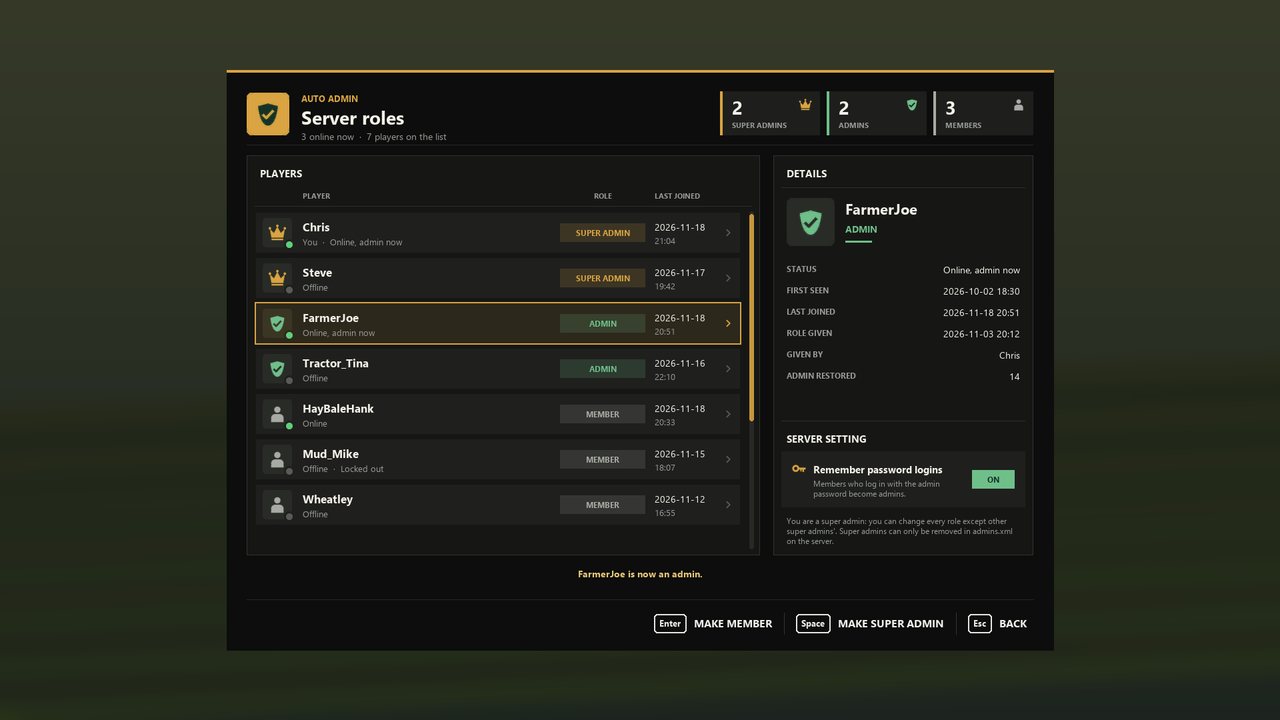
- The player list: role, online or not, last joined. Super admins first, then admins, then members.
- The selected player's details: first seen, last joined, when and by whom the role was given, how often their admin rights were restored on join.
- Make admin, Make member and Make super admin in the button bar; each asks first. Making someone super admin can't be undone in the game.
- Remove from list for offline members (they come back as members when they join again), and Remember password logins on or off.
Demoted means demoted
A player a super admin made a member can't make themselves admin again with the admin password. Such a login is undone a moment later. Promoting them again lifts that.
Where the list is kept
On the server, in modSettings/FS25_AutoAdmin/admins.xml: names, unique user ids, roles and dates, no passwords. To remove a super admin, stop the server, change their role="superAdmin" to admin or member in that file and start it again. The server rewrites the file on every change, so edits while it runs are lost.