
Say one mod makes tyres grip better in mud and another adds a wheel wear system. Both hook into the game's wheel code, and Farming Simulator doesn't referee that: whichever mod loads later decides, and the other one may quietly stop working.
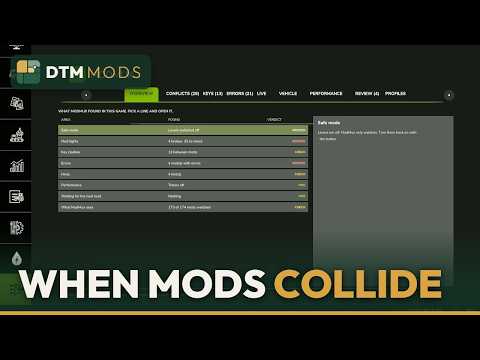
ModMux reads how every mod has hooked into the game, finds the spots where they meet, explains each one in plain words and lets you settle it from a page in the ESC menu.
The tabs
- OVERVIEW: where to start. One line per area with a verdict and a button that opens it, plus everything that waits for the next load, with Undo all.
- CONFLICTS: WHO BEATS WHOM lists the pairs of mods where one overwrites, may overwrite or takes over the other, with a verdict (Broken, Check, Probably fine, Fine) and a suggested fix. Let either one win, or let both run. SIMPLE, BY CATEGORY and ADVANCED go deeper, down to every hooked function.
- KEYS: keys and buttons that two mods use, or a mod and the game, in the same situation, so one press does two things. With a free key to move one to.
- ERRORS: one line per mod with the errors and warnings it wrote to the log, including scripts that stop while you play.
- LIVE: instant settings that mods offer, changed at once. F1 Toggle and Logistics Hub already put theirs here.
- VEHICLE, PERFORMANCE, REVIEW, PROFILES: readings of the vehicle you drive, what each mod costs per frame (and parking a heavy one), duplicate mods and HUD overlaps, and saved setups.
Built to be safe
- Your decisions take effect when the savegame loads next, never during play.
- Loading, saving and multiplayer sync are never touched.
- If a start doesn't finish, the next one runs with all ModMux changes off, so the game always loads. An empty MODMUX_SAFE_MODE.txt in modSettings/FS25_ModMux does the same by hand.
- If a savegame comes up with its farms missing, saving is refused for that session, so the damaged state can't replace your savegame.