DTMMODS

Fennell

ModMux

Shows where your mods collide inside the game, which one overwrites or takes over the other, and lets you decide who wins.

v1.0.0.2 · · 43 downloads

The zip is called FS25_0_ModMux.zip: the 0 makes the game load it before the mods it watches. Don't rename it.

It writes only into modSettings/FS25_ModMux and makes no internet connections.

In multiplayer, install it on the server and on every player's game, all on the same version.

See it in action

Video

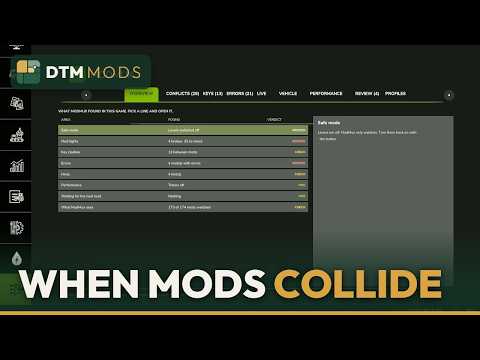
  • ModMux | Farming Simulator 25 mod: when mods collide | DTM Mods

Say one mod makes tyres grip better in mud and another adds a wheel wear system. Both hook into the game's wheel code, and Farming Simulator doesn't referee that: whichever mod loads later decides, and the other one may quietly stop working.

ModMux reads how every mod has hooked into the game, finds the spots where they meet, explains each one in plain words and lets you settle it from a page in the ESC menu.

The tabs

  • OVERVIEW: where to start. One line per area with a verdict and a button that opens it, plus everything that waits for the next load, with Undo all.
  • CONFLICTS: WHO BEATS WHOM lists the pairs of mods where one overwrites, may overwrite or takes over the other, with a verdict (Broken, Check, Probably fine, Fine) and a suggested fix. Let either one win, or let both run. SIMPLE, BY CATEGORY and ADVANCED go deeper, down to every hooked function.
  • KEYS: keys and buttons that two mods use, or a mod and the game, in the same situation, so one press does two things. With a free key to move one to.
  • ERRORS: one line per mod with the errors and warnings it wrote to the log, including scripts that stop while you play.
  • LIVE: instant settings that mods offer, changed at once. F1 Toggle and Logistics Hub already put theirs here.
  • VEHICLE, PERFORMANCE, REVIEW, PROFILES: readings of the vehicle you drive, what each mod costs per frame (and parking a heavy one), duplicate mods and HUD overlaps, and saved setups.

Built to be safe

  • Your decisions take effect when the savegame loads next, never during play.
  • Loading, saving and multiplayer sync are never touched.
  • If a start doesn't finish, the next one runs with all ModMux changes off, so the game always loads. An empty MODMUX_SAFE_MODE.txt in modSettings/FS25_ModMux does the same by hand.
  • If a savegame comes up with its farms missing, saving is refused for that session, so the damaged state can't replace your savegame.
Questions

Questions and answers

Why does ModMux say some mods can't be watched?

ModMux has to load before the mods it watches, and the game loads mods in the order of their file names. A mod whose name sorts before FS25_0_ModMux.zip, like one that doesn't start with FS25_, loads earlier: CONFLICTS and ModMux.log name those mods.

What does "may overwrite" mean?

The mod put in its own version of a function, so from the outside ModMux can't see whether the other mod's change still runs inside it. It checks while you play: once the function has run 20 times, the conflict shows whether that change still runs or is lost, and ModMux remembers it for the next starts.

Does every pair on CONFLICTS mean something is broken?

No. When one mod runs after the other, both run. WHO BEATS WHOM only shows the pairs that need a look; Show all lists the harmless ones too.

What happens when I park a mod?

From the next load, the mod's own per-frame work (its update and draw) stops, but it stays installed. Its vehicles and buildings keep working; its HUD, timers and automation stop.

How do I set it up on a dedicated server?

Each computer applies its own setup, and what the server runs (AI, saving, events) follows the server's. On the server, modMux lists the conflicts with their ids, modMuxPick <id> <mod name|shared|default> picks a winner, modMuxPark <mod name> parks a mod and modMuxReport writes the summary file. Picks and parking apply from the next start.

Where can I read what ModMux found outside the game?

Every load writes a plain-text summary to modSettings/FS25_ModMux/ModMux.log, and it is written again when you leave the game. If mods cut each other off, you also get a notification shortly after the game starts.

Can my own mod put settings on the LIVE tab?

Yes: call g_modMux.registerLiveSetting in your loadMap when g_modMux is there. It takes switches (bool), numbers and choices, and ModMux remembers the value for the next time. The README has an example.

What changed

Version history

Follow this mod's updates (RSS)

v1.0.0.2
  • New first tab OVERVIEW: one line per area (mod fights, key clashes, errors, hints, performance, what waits for the next load, what ModMux can see), each with a verdict and an Open button. The changes waiting for the next load are listed in words, with Undo all.
  • ERRORS shows one line per mod (its errors and warnings in the panel); All messages lists them one by one.
  • KEYS suggests a free key for each clash ("Free: Left Alt + G").
  • The page is called just ModMux.
  • Easier to read: WHO BEATS WHOM shows only pairs that need a look (Show all lists the rest); every pair gets a verdict (Broken, Check, Probably fine, Fine) and a suggested fix, which is also the first button; functions are named in words ("HUD: draw speed"); every tab shows how many things wait on it ("CONFLICTS (3)"); an undecided conflict says Not set instead of "Load order"; All levers off moved to the ADVANCED view.
  • CONFLICTS opens on the new WHO BEATS WHOM view: one line per pair of mods, saying what the one does to the other: overwrites (the other's change is gone), may overwrite (it put in its own version; whether the other's change still runs inside is checked while you play), takes over (it wraps the other and decides whether it runs) or runs after / before (both run). The buttons let either one win (it is ranked above the other, nobody else is muted) or let both run. ADVANCED uses the same words.
  • New KEYS tab: keys and buttons that two mods use, or a mod and the game, in a situation where both can fire (on foot, in a vehicle, always), so one press does two things. It reads your own key settings (inputBinding.xml), each mod's actions and default keys, and the game's action list. Change keys under Settings > Controls.
  • New ERRORS tab: errors and warnings sorted by mod. ModMux sees what mods write to the log from its own load on, and per-frame scripts that stop with a Lua error. Messages only the engine writes (missing textures) stay in log.txt. Both lists are also in ModMux.log, which is written again when you leave the game.